Harbor & Co.
Trade cargo, manage ships, and build supply chains.
Harbor & Co.
Cargo trading · Shipping routes · Fleet management
Run a shipping company.
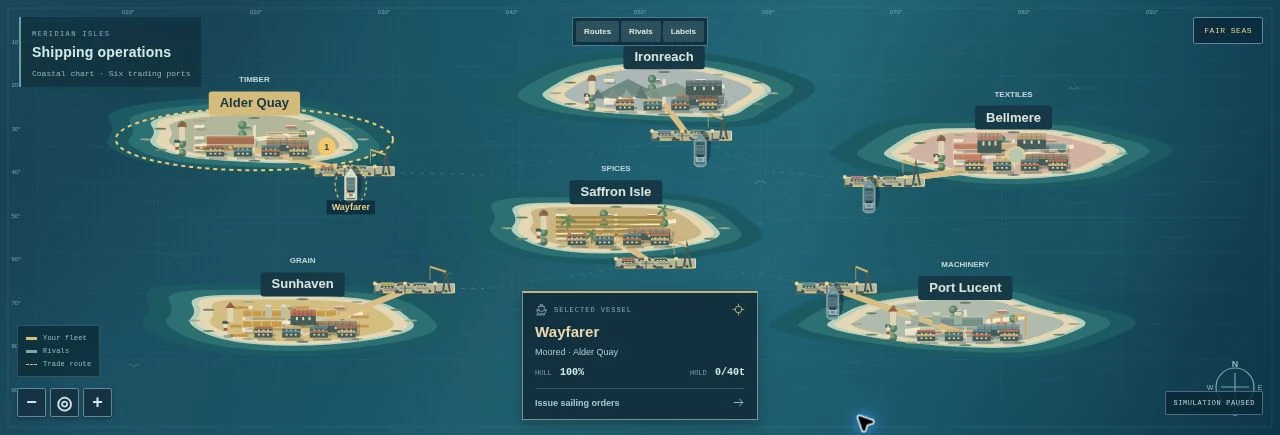
Alder Quay has timber. Sunhaven needs it. Your first ship is waiting at the dock. Find a buyer, carry a cargo, and turn that first voyage into a network that connects the coast.
Buy and sell in markets with finite stock and changing prices. Put ships on regular routes, fulfill delivery contracts, and build depots and factories. Rival companies trade on the same sea. Fuel, crew costs, hull wear and weather make each voyage a business decision.
Your first voyage
Load the 25 tonnes of timber in your Alder Quay depot. Open Fleet, select Sunhaven, and set sail. Press 1× to advance time. Once moored, select Sunhaven in Trade and sell your cargo. Look for a useful return cargo before you leave.
A business with moving parts
Six ports and six goods. Four ship classes, expanded holds and hull repairs. Automatic trade routes, delivery contracts, three rival shipping lines, depots, two factory types, three research projects and five company milestones.
Two ways to begin
Campaign: one coastal trader, $26,000, a depot and a first shipment. Build toward a maritime empire and keep playing afterwards.
Sandbox: $160,000, extra reputation and optional rescue funds, with no company closure.
Controls & saves
Click a port or ship on the map, or use the department controls. Drag to pan and scroll to zoom. Space pauses; 1, 2 and 3 select speeds. Company menu includes a guide and save export/import. Progress is stored on this browser in its own save slot. Best on a computer or expanded in landscape.